바이오스에서 딸깍! MSI AI 부스트와 함께 인텔 코어 울트라 9 285K AI 성능을 17% 향상시키기
Motherboards
인텔 코어 울트라 200S 시리즈 프로세서에는 AI 작업을 효율적으로 처리하도록 설계된 신경 처리 장치(NPU)가 탑재되어 있습니다. AI 컴퓨팅 성능을 더욱 향상시키기 위해 MSI는 BIOS에서 활성화할 수 있는 AI 부스트 기능을 도입했습니다.
MSI AI 부스트는 세 가지 성능 모드를 제공합니다: 1단계, 2단계, 3단계로 사용자가 프로세서의 성능에 따라 최적의 모드를 선택할 수 있습니다.
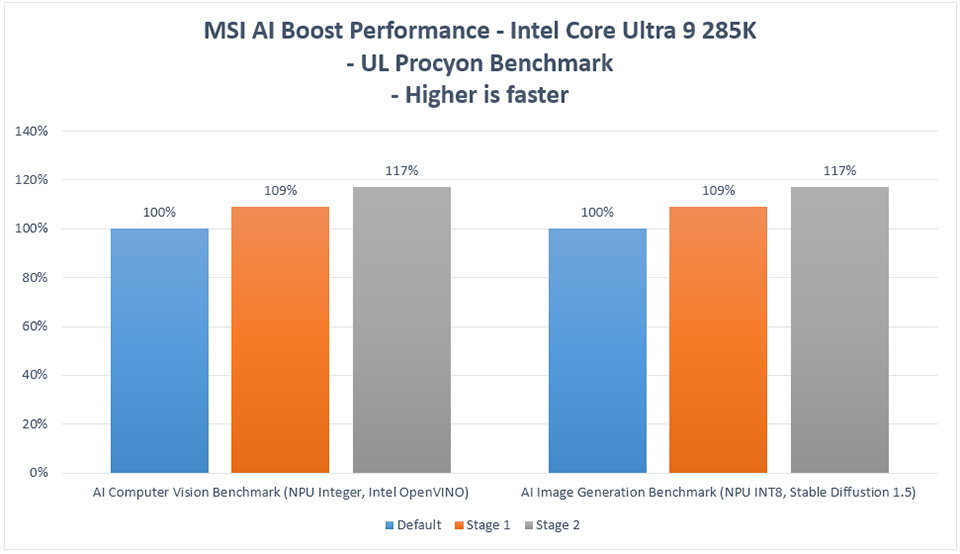
예를 들어, 인텔 코어 울트라 9 285K를 UL Procyon AI 벤치마킹 툴을 사용하여 테스트한 결과, 1단계 모드에서는 약 9%, 2단계 모드에서는 최대 17%까지 NPU 성능이 향상되었습니다.
MSI AI 부스트 활성화 방법
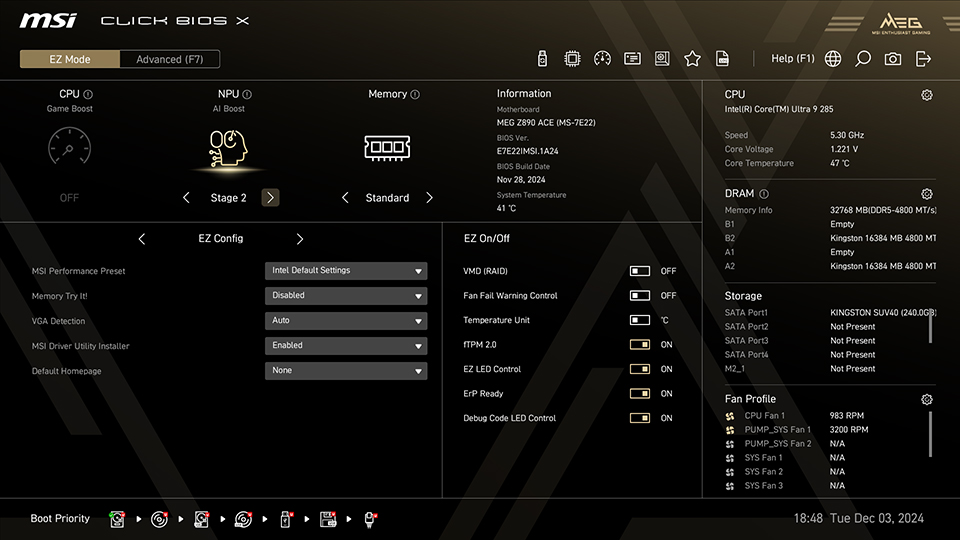
EZ 모드에서 MSI 클릭 바이오스 X에 액세스하고 화면 상단의 AI 부스트 옵션에서 원하는 AI 부스트 모드를 선택하기만 하면 됩니다.
테스트 시스템 :
CPU: Intel Core Ultra 9 285K
Motherboard: MSI MEG Z890 에이스
Memory: Kingston FURY Beast DDR5-4800 16GBx2
Graphics Card: MSI GeForce RTX 4090 슈프림 X 24G
SSD: Kingston SNV2S/2000G
CPU Cooler: MSI MAG 코어리퀴드 I360
Power Supply: MSI MEG Ai1300P PCIE5
Operating System: Windows 11 Pro 24H2, build 26100.2314
CPU: Intel Core Ultra 9 285K
Motherboard: MSI MEG Z890 에이스
Memory: Kingston FURY Beast DDR5-4800 16GBx2
Graphics Card: MSI GeForce RTX 4090 슈프림 X 24G
SSD: Kingston SNV2S/2000G
CPU Cooler: MSI MAG 코어리퀴드 I360
Power Supply: MSI MEG Ai1300P PCIE5
Operating System: Windows 11 Pro 24H2, build 26100.2314
참고: MSI AI 부스트를 활성화하려면 오버클러킹이 필요하므로 시스템 안정성에 영향을 줄 수 있습니다.
MSI Z890 메인보드 : https://www.msi.com/Landing/intel-arrow-lake-core-ultra-z890-b860-h810-best-ai-pc-gaming-motherboard.